
티스토리 뷰
문제
이전 버전에서 IDE를 2025.1+ 릴리스로 업데이트한 후, "Git" 도구 창의 "로컬 변경 사항" 탭이 사라졌습니다.
원인
"로컬 변경 사항" 탭과 모달 커밋 대화 상자가 별도의 플러그인으로 이동되었으며, 이를 활성화하는 옵션도 IDE 설정 내에서 이동되었습니다. 이 결정과 결과에 대한 논의에 대한 자세한 내용은 다음 링크에서 확인할 수 있습니다: https://youtrack.jetbrains.com/projects/IJPL/issues/IJPL-177161.
해결 방법
1. Install and enable the Modal Commit Interface plugin in Settings (⌘ + , or Ctrl + Alt + S) > Plugins.

2.Enable the option Settings (⌘ + , or Ctrl + Alt + S) > Advanced Settings > Version Control > Use modal commit interface for Git and Mercurial
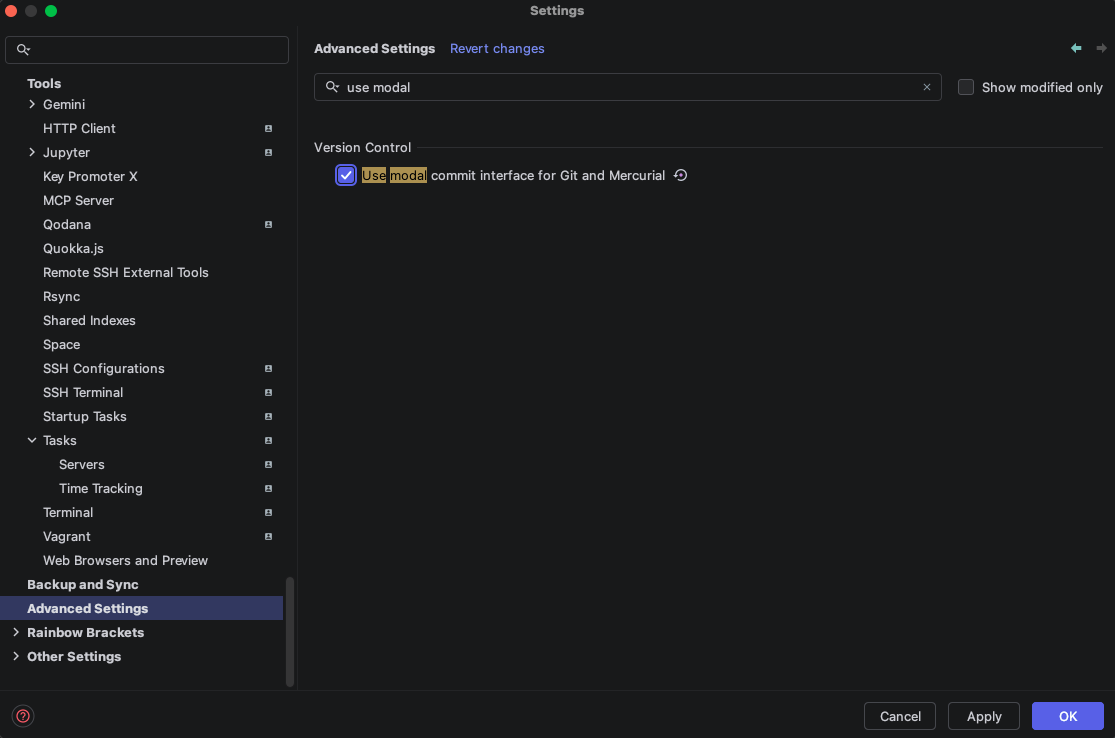
3.Disable the option Settings (⌘ + , or Ctrl + Alt + S) > Version Control > Git > Enable staging area

"로컬 변경 사항" 탭과 모달 커밋 인터페이스를 활성화하려면:
설정(⌘ + , 또는 Ctrl + Alt + S) > 플러그인에서 Modal Commit Interface 플러그인을 설치하고 활성화하세요.
설정(⌘ + , 또는 Ctrl + Alt + S) > 고급 설정 > 버전 관리 > Git 및 Mercurial용 모달 커밋 인터페이스 사용 옵션을 활성화하세요.
설정(⌘ + , 또는 Ctrl + Alt + S) > 버전 관리 > Git > 스테이징 영역 활성화 옵션을 비활성화하세요.
https://youtrack.jetbrains.com/articles/SUPPORT-A-1996/Local-Changes-Tab-Missing-after-IDE-update-to-2025.1
youtrack.jetbrains.com
- Total
- Today
- Yesterday
- mybatis
- 오라클
- claude
- Java
- maven
- config-location
- elasticsearch
- LocalDate
- JavaScript
- rocky
- mybatis config
- Kotlin
- docker
- Spring
- localtime
- Linux
- svn
- jQuery
- Spring Security
- input
- Mac
- oracle
- springboot
- 북리뷰
- LocalDateTime
- k8s
- window
- Bash tab
- repomix
- intellij
| 일 | 월 | 화 | 수 | 목 | 금 | 토 |
|---|---|---|---|---|---|---|
| 1 | 2 | 3 | 4 | 5 | 6 | 7 |
| 8 | 9 | 10 | 11 | 12 | 13 | 14 |
| 15 | 16 | 17 | 18 | 19 | 20 | 21 |
| 22 | 23 | 24 | 25 | 26 | 27 | 28 |